# flowgram.ai
**Repository Path**: ByteDance/flowgram.ai
## Basic Information
- **Project Name**: flowgram.ai
- **Description**: FlowGram是一个基于节点的流程构建引擎,帮助开发者快速创建固定布局或自由连接布局的 workflows。
- **Primary Language**: Unknown
- **License**: MIT
- **Default Branch**: main
- **Homepage**: https://FlowGram.ai
- **GVP Project**: No
## Statistics
- **Stars**: 63
- **Forks**: 21
- **Created**: 2025-02-28
- **Last Updated**: 2026-10-30
## Categories & Tags
**Categories**: process-engine
**Tags**: None
## README

[](https://github.com/bytedance/flowgram.ai/blob/main/LICENSE) [](https://www.npmjs.com/package/@flowgram.ai/editor) [](https://deepwiki.com/bytedance/flowgram.ai) [](https://juejin.cn/column/7479814468601315362)
[](https://trendshift.io/repositories/13877)
# FlowGram.AI|工作流开发框架
[English](README.md) | [中文](README_ZH.md) | [Español](README_ES.md) | [Русский](README_RU.md) | [Português](README_PT.md) | [Deutsch](README_DE.md) | [日本語](README_JA.md)
FlowGram 是一个可组合、可视化、易于集成且可扩展的工作流开发框架与工具集。
我们的目标是帮助开发者以更快、更简单的方式搭建 AI 工作流平台。
FlowGram 内置开箱即用的工作流开发能力:可视化流程画布、节点配置表单、变量作用域链,以及开箱即用的物料(LLM、条件、代码编辑器等)。框架包提供构建工作流平台的基础能力,FlowGram Desktop 则将这些能力整合为原生桌面 Agent 工作台。
了解更多 [FlowGram.AI 🌐](https://flowgram.ai)
## 🖥️ FlowGram Desktop
FlowGram Desktop 是面向 macOS 和 Windows 的原生桌面 Agent 工作台,通过对话与可视化画布衔接工作流的搭建、运行、调试和复用。
- **搭建:** 用对话描述需求,在画布中调整节点、条件、并行分支、汇合与循环。
- **调试:** 单独测试节点,查看输入输出,回看执行路径与历史工作流快照。
- **复用:** 发布带版本的工作流,供 HTTP、MCP 或其他工作流调用。
- **管理:** 按项目组织工作流与会话,导入导出工程,支持中英文界面与明暗主题,并内置六套行业示例项目。
[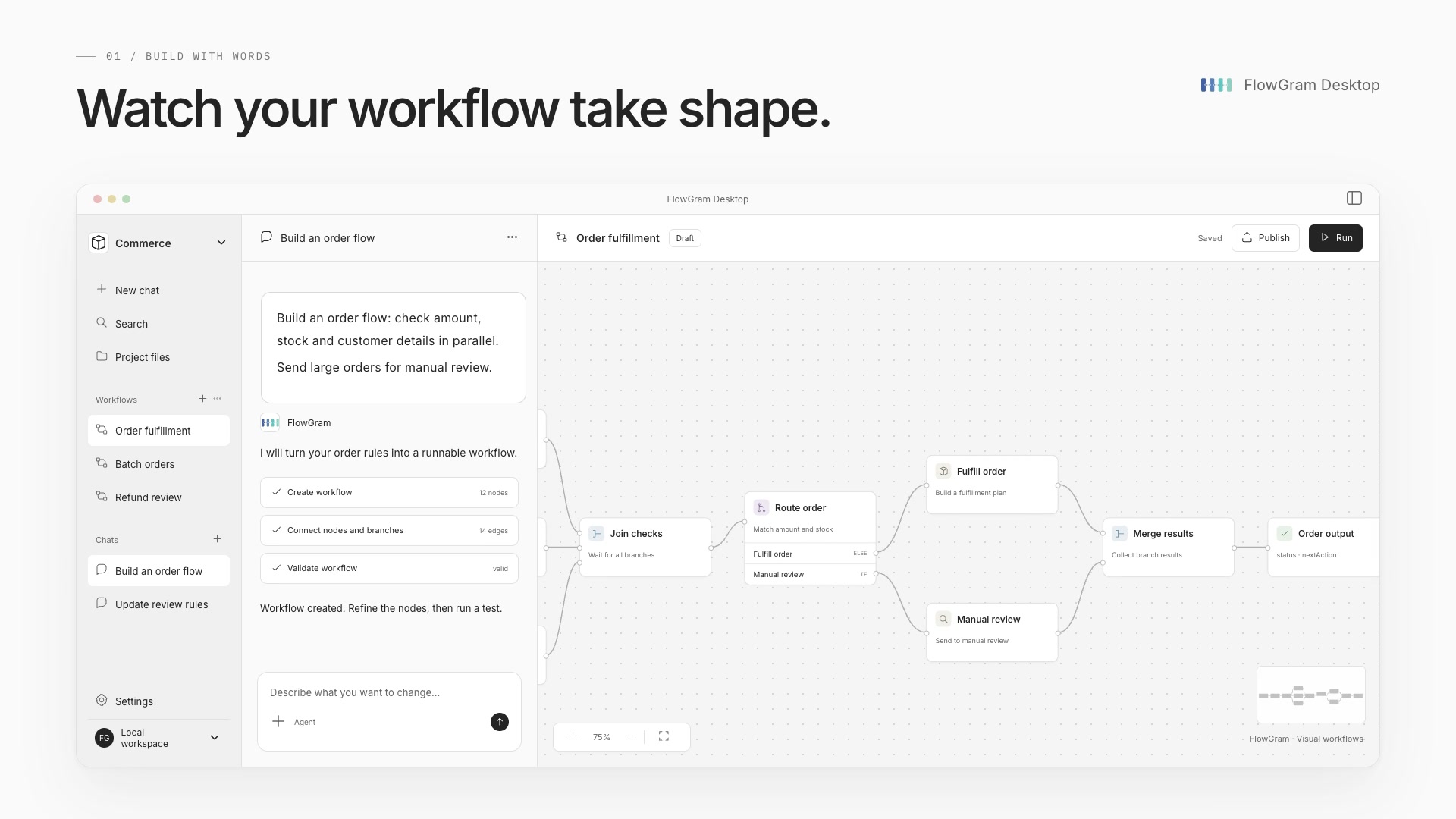](https://flowgram.ai/desktop/flowgram-desktop-en.mp4)
[▶ 观看 45 秒产品视频(英文)](https://flowgram.ai/desktop/flowgram-desktop-en.mp4) · [Desktop 使用与开发说明](./apps/desktop/README.md)
### 下载 Desktop
[⬇ 最新预览版](https://github.com/bytedance/flowgram.ai/releases/tag/desktop-preview)
选择平台下载最新预览版。三个平台全部构建成功后自动更新安装包,下载地址保持不变。
| 平台 | 下载 |
| --- | --- |
| macOS · Apple Silicon (ARM64) | [下载 DMG](https://github.com/bytedance/flowgram.ai/releases/download/desktop-preview/FlowGram_aarch64-apple-darwin.dmg) |
| macOS · Intel | [下载 DMG](https://github.com/bytedance/flowgram.ai/releases/download/desktop-preview/FlowGram_x86_64-apple-darwin.dmg) |
| Windows 10/11 · x64 | [下载 EXE](https://github.com/bytedance/flowgram.ai/releases/download/desktop-preview/FlowGram_x86_64-pc-windows-msvc-setup.exe) |
直接下载安装器,无需登录 GitHub。macOS 打开 .dmg,Windows 运行安装程序 .exe。校验和与构建信息可在发布页查看。预览安装包尚未签名,macOS 版本尚未公证。
## 🎬 演示
在 [CodeSandbox 🌐](https://codesandbox.io/p/github/louisyoungx/flowgram-demo/main) 或 [StackBlitz 🌐](https://stackblitz.com/~/github.com/louisyoungx/flowgram-demo) 中打开
在该演示中,我们遍历一组城市,通过 HTTP 获取实时天气,用 Code 节点解析温度,借助 LLM 生成穿搭建议,经由 Condition 进行筛选,在循环中汇总结果,最后使用 Advisor LLM 选出最舒适的城市,并将结果发送至 End 节点。
## 🚀 快速上手
1. 创建一个新的 FlowGram 项目:
```sh
npx @flowgram.ai/create-app@latest
```
> 我们推荐选择 `Free Layout Demo ⭐️` 模板。
2. 启动项目:
```sh
cd demo-free-layout
npm install
npm start
```
3. 在浏览器中打开 [http://localhost:3000](http://localhost:3000)。
## ✨ 特性
| 特性 | 说明 | 演示 |
| -------------------------------------------------------------------------------------------- | --------------------------------------------------------------------------------- | -------------------------------------------------------------------------------------------- |
| [Free Layout Canvas](https://flowgram.ai/examples/free-layout/free-feature-overview.html) | 自由布局画布,节点可任意摆放,可在节点间创建边进行链接。 |  |
| [Fixed Layout Canvas](https://flowgram.ai/examples/fixed-layout/fixed-feature-overview.html) | 固定布局画布,节点可拖拽至指定位置,支持复合节点(如分支与循环)。 |  |
| [Form](https://flowgram.ai/examples/node-form/basic.html) | 表单引擎管理节点数据的增删改查操作,并提供渲染、验证、副作用、联动和错误捕获等功能,简化节点配置的开发。 |  |
| [Variable](https://flowgram.ai/guide/variable/basic.html) | 变量引擎支持作用域约束、变量结构检查和类型推断等功能,便于管理工作流中的数据流。 |  |
## 📖 文档
你可以在官网查阅完整文档:[FlowGram 文档](https://flowgram.ai)。
文档分为以下章节:
- [快速入门](https://flowgram.ai/guide/getting-started/introduction.html)
- [自由画布](https://flowgram.ai/guide/free-layout/load.html)
- [固定画布](https://flowgram.ai/guide/fixed-layout/load.html)
- [表单](https://flowgram.ai/guide/form/form.html)
- [变量](https://flowgram.ai/guide/variable/basic.html)
- [素材](https://flowgram.ai/materials/introduction.html)
- [运行时](https://flowgram.ai/guide/runtime/introduction.html)
- [进阶指南](https://flowgram.ai/guide/advanced/zoom-scroll.html)
- [API 参考](https://flowgram.ai/api/index.html)
- [获取支持](https://flowgram.ai/guide/contact-us.html)
- [贡献指南](https://flowgram.ai/guide/contributing.html)
## 🙌 贡献者
[](https://github.com/bytedance/flowgram.ai/graphs/contributors)
## 🌍 被这些项目采用
- [Coze Studio](https://github.com/coze-dev/coze-studio) 是一体化的 AI Agent 开发工具,提供最新的大模型与工具、多样的开发模式与框架,并在从开发到部署的全流程中,提供最便捷的 Agent 开发体验。
- [NNDeploy](https://github.com/NNDeploy/nndeploy) 是一个基于工作流的多平台 AI 部署工具。
- [Certimate](https://github.com/certimate-go/certimate) 是开源的 SSL 证书管理工具,借助可视化工作流帮助你自动申请与部署证书;它也是官方文档列出的 Let's Encrypt ACME 客户端选项之一。
## 📬 联系我们
- 问题反馈: [Issues](https://github.com/bytedance/flowgram.ai/issues)
- 飞书:使用 [Register Feishu](https://www.feishu.cn/en/) 扫码下方二维码,加入 FlowGram 用户群。
