# NAVA
**Repository Path**: TensorVoice/NAVA
## Basic Information
- **Project Name**: NAVA
- **Description**: No description available
- **Primary Language**: Unknown
- **License**: Not specified
- **Default Branch**: main
- **Homepage**: None
- **GVP Project**: No
## Statistics
- **Stars**: 0
- **Forks**: 0
- **Created**: 2026-06-03
- **Last Updated**: 2026-06-03
## Categories & Tags
**Categories**: Uncategorized
**Tags**: None
## README

# NAVA — Native Audio-Visual Alignment for Generation




NAVA is a Native Audio-Visual Alignment framework that formulates joint audio-video generation as *context-conditioned native audio-visual alignment*. NAVA first establishes audio-video correspondence in a dedicated alignment space and then applies context as external conditioning to guide the aligned representation. It is instantiated with an Align-then-Fuse MMDiT architecture, which progressively bridges modality-aware alignment and unified audio-video denoising. To support controllable speech generation, NAVA further introduces Timbre-in-Context Conditioning, which binds reference timbre cues to corresponding speech spans through the context pathway. With only **6.3B** parameters, NAVA achieves superior audio-visual synchronization and video quality, competitive audio quality, and substantially improved reference-timbre controllability.
> [!IMPORTANT]
> **This repository is a complete open-source release of the NAVA codebase.**
> It ships end-to-end: full inference pipeline, interactive Gradio demo, and training code — everything you need to run, fine-tune, and build on NAVA.
## Demo
https://github.com/user-attachments/assets/a02cc83d-b5a3-42ac-9a77-952e0c3bd0fe
---
## Features
- **720p in ~1 Minute** — Generate synchronized 720p audio-video in about one minute on 8 GPUs with Ulysses sequence parallelism.
- **Native Stereo Audio** — Jointly generate scene sounds and speech with video, no post-hoc vocoder alignment required.
- **Multi-Timbre Voice Control** — Bind reference WAVs to speech spans for precise per-speaker voice identity.
- **Powerful TTS Synthesis** — High-quality speech generation including long, complex sentences in English; limited other languages' support.
- **Text-Driven Camera Control** — Specify shot composition, camera motion, and pacing directly in the prompt.
- **Flexible Aspect Ratios** — Generate landscape, portrait, and square videos from the same checkpoint.
- **Strong Audio & Alignment from Scratch** — Video branch warm-started from a pretrained backbone; the audio branch and audio-visual alignment are trained entirely from scratch with limited compute, yet deliver strong synchronization and audio quality.
## Quick Start
**1. Install dependencies**
```bash
# Install PyTorch matching your CUDA build first
pip install torch torchvision torchaudio
# Core + I/O + sequence parallel + (optional) vLLM rewrite + Gradio
pip install -r requirements.txt
# Flash-Attention has to be built with --no-build-isolation
pip install flash-attn --no-build-isolation
```
> The vLLM and Gradio entries in `requirements.txt` are only needed for the prompt-rewrite server (`pe_src/`) and the interactive Web UI (`gradio_demo/`); comment them out if you don't use those paths.
**2. Download weights** (one command pulls `NAVA.safetensors`, `NAVA_fp8.safetensors`, and all dependencies into the project root):
```bash
# Default — pulls both bf16 and fp8 checkpoints (~31 GB total)
huggingface-cli download ernie-research/NAVA --local-dir ./
# bf16 only (high-VRAM setups, e.g. 8×H100, A100 80 GB):
huggingface-cli download ernie-research/NAVA --local-dir ./ \
--exclude "NAVA_fp8.safetensors"
# fp8 only (single 24-48 GB GPU, ComfyUI):
huggingface-cli download ernie-research/NAVA --local-dir ./ \
--exclude "NAVA.safetensors"
```
**3. Run inference** (8 GPUs with sequence parallel) — first pick the script for your **task**:
```bash
# General T2AV (text-only)
bash scripts/inference.sh
# I2AV + Timbre Control (first-frame image + reference voice)
bash scripts/inference_timbre.sh
# T2A (audio-only, with or without timbre reference)
bash scripts/inference_t2a.sh
```
The three scripts above keep the full model resident on GPU and require **80 GB peak VRAM**. If your hardware can't afford that, two extra scripts demonstrate how to trade speed for VRAM — copy the relevant flags (`--t5_offload`, `--group_offload`, `--vae_tiling`, etc.) into the task script of your choice:
| Reference script | Peak VRAM | Speed | What it offloads |
|---|---|---|---|
| `scripts/inference.sh` (baseline) | **80 GB** | **1 s / step** | Nothing — full model resident on GPU throughout |
| `scripts/inference_offload_t5.sh` | **48 GB** | **1 s / step** | T5 text encoder (~11 GB) moved to CPU after text encoding; zero cost during denoising |
| `scripts/inference_fp8.sh` | **~18 GB** | **~1.1 s / step** | T5 offload + DiT block-Linears stored as `fp8_e4m3fn` + VAE spatial tiling |
| `scripts/inference_group_offload_t5.sh` | **42 GB** | **3.5 s / step** | T5 offload + DiT backbone blocks paged CPU↔GPU one group at a time (pinned memory, async stream) + VAE spatial tiling (decode one 22×40 latent tile at a time, blend on CPU; latent is 44×80 for 704×1280) |
All numbers measured at 704×1280, 37 frames, 50 steps, **8×H100** with sequence parallel. `inference_group_offload_t5.sh` exposes `OFFLOAD_GROUP_SIZE` (default `10`, range `1–30`) — smaller values keep fewer DiT blocks on GPU simultaneously, lowering peak VRAM in exchange for more CPU↔GPU transfers per step. Pass it as an env var when launching the script.
For batch runs, custom prompts, or other modes, see [Inference](#inference). For the full weight manifest, see [Model Weights](#model-weights).
**4. Batch rewrite your prompts** (recommended before any inference):
```bash
# Start the vLLM rewrite server once (stays in the background)
cd pe_src && bash start_server.sh --gpu 0 && cd ..
# Rewrite — input is one prompt per line, output is line-aligned
python pe_src/rewrite.py \
--input my_prompts.txt \
--output my_prompts_rewritten.txt \
--concurrency 32
# Convert to JSONL and run
awk '{print "{\"prompt\": \""$0"\"}"}' my_prompts_rewritten.txt > my_prompts.jsonl
DATA_FILE=my_prompts.jsonl bash scripts/inference.sh
```
> [!TIP]
> **Always rewrite prompts before inference.** NAVA is trained on high-quality Chinese dense captions; the rewriter expands a short description into a single-paragraph cinematic prompt with explicit scene / motion / audio design — the format that activates the model's full potential. For single prompts or interactive use, see [Prompt Engineering](#prompt-engineering-rewrite).
## Model Architecture
NAVA uses a **30-layer Align-then-Fuse MMDiT** backbone with flow matching:
- **10 Hierarchical Alignment Layers**: dedicated audio/video paths establish fine-grained AV correspondence in a native alignment space — independent QKV per modality, joint self-attention over concatenated video + audio tokens, and per-stream text cross-attention.
- **20 Unified Fusion Layers**: a single shared transformer stack performs context-conditioned denoising on the aligned representation — shared QKV/FFN, joint self-attention across all tokens, unified text cross-attention.
- **Timbre-in-Context Conditioning**: reference-WAV speaker embeddings are bound to `...` speech spans through the context pathway, enabling per-speaker timbre control without entangling identity into the alignment space.
- **RoPE**: 3D rotary embeddings for video (T + H + W), 1D for audio; **AdaLN-Zero** timestep modulation per block.
## Evaluation
### General Capability on VerseBench
NAVA achieves the best AV synchronization (Sync-C / Sync-D / IB) and video quality with the smallest parameter budget.

### Timbre-Control Speech Performance (SeedTTS-Eval-EN)
Audio-only models are listed as *reference* only — they are dedicated speech systems and not directly comparable. Among joint audio-video models, NAVA delivers speech quality close to dedicated audio-only systems.

### User Study
We conduct human GSB (Win / Tie / Lose) preference studies on both T2AV and TI2AV against open-source baselines (Ovi-1.1, LTX-2.3, MoVA, daVinci). NAVA achieves competitive **Overall Quality** across all comparisons and wins on **Audio-Visual Alignment** against all baselines.

## Inference
### Input Format (JSONL)
All inference modes use a unified **JSONL** format (one JSON object per line):
```jsonl
{"prompt": "一位男子在海边奔跑,镜头跟随。写实电影感,自然光。背景是海浪声和风声。"}
{"prompt": "描述文本...", "image_path": "/abs/path/to/first_frame.png"}
{"prompt": "两人对话HelloHi there", "spk_wavs": ["/path/to/spk1.wav", "/path/to/spk2.wav"]}
{"prompt": "...", "image_path": "/path/to/img.png", "spk_wavs": ["/path/to/spk.wav"]}
```
| Field | Required | Description |
|-------|----------|-------------|
| `prompt` | Yes | Text caption (also accepts legacy `text` field name) |
| `image_path` | No | Absolute path to first frame image → auto-enables I2V mode for this sample |
| `spk_wavs` | No | List of absolute paths to speaker reference WAVs (max 2) for timbre control |
A single JSONL file can mix text-only, I2V, and timbre-control entries.
### Batch Inferencer
Each GPU independently processes a slice of the input JSONL — best for many-prompt throughput. Defaults to `infer_cases/general/prompts.jsonl`; override with env vars.
```bash
bash scripts/inference_batch.sh
# Custom paths:
CKPT=/path/to/your.safetensors \
DATA_FILE=/path/to/prompts.jsonl \
OUT_DIR=eval_results/batch_run1 \
bash scripts/inference_batch.sh
```
### Sequence Parallel (SP=8, Recommended for Single-Sample)
All 8 GPUs cooperatively process the same sample for faster inference:
```bash
SETUPTOOLS_USE_DISTUTILS=stdlib torchrun \
--nnodes=1 \
--nproc_per_node=8 \
--master_addr=127.0.0.1 \
--master_port=29507 \
inference_nava.py \
--config configs/nava.yaml \
--ckpt NAVA.safetensors \
--out_dir ./eval_results_sp \
--data_format json \
--data_file your_data.jsonl \
--width 1280 \
--height 704 \
--frames 37 \
--fps 24 \
--steps 50 \
--save_sample \
--gen_turn 1 \
--use_sp
```
### FP8 Quantization (Lower VRAM)
Quantize the DiT backbone block-Linears to `fp8_e4m3fn` to cut backbone weight memory roughly in half (~12 GB → ~6 GB) — useful for fitting NAVA on smaller GPUs without the 3× slowdown of `group_offload`. Norms / modulation / VAE / T5 stay in bf16; only the `(self_attn | cross_attn | ffn)` Linears inside `*_blocks..` are quantized.
**Step 1 — get an fp8 checkpoint.** Two paths:
```bash
# Option A: download the pre-quantized release (recommended, no GPU needed)
huggingface-cli download ernie-research/NAVA --local-dir ./ \
--include "NAVA_fp8.safetensors"
# Option B: convert your own (use this if you fine-tuned NAVA — quantize the
# resulting checkpoint locally, no need to re-upload). Loads NAVA.safetensors
# on CPU, ~30 GB peak RAM during conversion.
python -m NAVA_FP8.convert_to_fp8 -i NAVA.safetensors -o NAVA_fp8.safetensors
```
**Step 2 — run inference** with the dedicated script:
```bash
bash scripts/inference_fp8.sh
# or override paths
CKPT=NAVA_fp8.safetensors DATA_FILE=my.jsonl bash scripts/inference_fp8.sh
```
To enable fp8 in any other inference script, add `--weight_dtype fp8_e4m3fn` (or rely on auto-detection by simply pointing `--ckpt` at an fp8 file — `--weight_dtype` defaults to `auto`).
| Mode | When to use |
|---|---|
| `--weight_dtype auto` (default) | Detects fp8 by scanning the state-dict — drop in `NAVA_fp8.safetensors` and it just works |
| `--weight_dtype fp8_e4m3fn` | Force the fp8 patch path (warns if checkpoint is not fp8) |
| `--weight_dtype bf16` | Force the standard bf16 path (warns if checkpoint is fp8) |
Phase 1 is **weight-only quantization** — matmul still runs in bf16 after on-the-fly dequant, so VRAM drops but compute is ~10% slower per step than bf16. The big win is avoiding `group_offload` on 24 GB single-GPU setups (~2.5× faster end-to-end than `bf16 + group_offload`). See [`NAVA_FP8/README.md`](NAVA_FP8/README.md) for design details, the conversion CLI, and the numerical-alignment test (`python -m NAVA_FP8.tests.verify_numerics`).
Generate audio without video using the same NAVA checkpoint. Supports both pure sound-design prompts and timbre-controlled speech — the distinction is simply whether `spk_wavs` is present in the JSONL entry.
```jsonl
{"prompt": "清晨山间,远处溪流潺潺,鸟鸣声此起彼伏。画面中没有人物对白,也没有任何旁白。"}
{"prompt": "...Hello, it's great to meet you....", "spk_wavs": ["/path/to/spk.wav"]}
{"prompt": "...First speaker line....Second speaker line....", "spk_wavs": ["/path/spk1.wav", "/path/spk2.wav"]}
```
`spk_wavs[i]` binds to the i-th `...` span in order. Omit `spk_wavs` entirely for pure scene-audio generation.
```bash
bash scripts/inference_t2a.sh
# Override defaults:
DURATION=8.0 \
DATA_FILE=/path/to/prompts.jsonl \
OUT_DIR=eval_results/my_t2a \
TIMBRE_SCALE=3.0 \
bash scripts/inference_t2a.sh
```
Outputs land at `$OUT_DIR/{save_name}-0.wav`. Config: `configs/nava_seedtts.yaml` (`modality: audio`). The `--timbre_cfg` flag is always on — it has no effect when `spk_wavs` is absent.
### SeedTTS Benchmark (Audio-Only)
Evaluate zero-shot speech synthesis on the [SeedTTS test set](https://github.com/BytedanceSpeech/seed-tts-eval). Drop the official testset under `infer_cases/seedtts/{zh,en}/` (see [`infer_cases/seedtts/README.md`](infer_cases/seedtts/README.md) for the expected layout), then:
```bash
# Chinese split (default)
bash scripts/inference_seedtts.sh
# English split
LANG=en bash scripts/inference_seedtts.sh
```
Each line of `meta.lst` is `utt_id|prompt_text|prompt_wav|infer_text`; outputs land at `eval_results/seedtts/{lang}/{utt_id}.wav`. Uses `configs/nava_seedtts.yaml` (audio-only) and runs the same NAVA checkpoint with `--seedtts_mode --timbre_cfg` enabled.
### Gradio Interactive Demo (SP=8)
Web UI with prompt rewriting, image upload, and speaker reference:
```bash
cd gradio_demo
bash start_gradio.sh
```
Or with custom paths:
```bash
bash gradio_demo/start_gradio.sh \
--config /path/to/config.yaml \
--ckpt /path/to/NAVA.safetensors \
--rewrite_model /path/to/Qwen3-4B-Thinking-2507 \
--port 8000 \
--nproc 8 \
--share
```
Debug mode (no models, UI only):
```bash
python gradio_demo/gradio_server.py --debug --port 8000
```
### Prompt Engineering (Rewrite)
For optimal generation quality, **always rewrite your prompt before inference** — especially if the input is in English or short. NAVA is primarily trained on **high-quality Chinese dense captions**; the rewriter expands a brief description into a single-paragraph cinematic prompt with explicit subject / scene / motion timeline / camera language / audio design — the format that activates the model's full potential.
> [!TIP]
> **Prefer a commercial LLM if available.**
>
> - **Best:** Call GPT / Gemini / Doubao etc. with **thinking mode on**, using the same system prompt at `pe_src/prompts/rewrite_template.txt`. Output is more accurate and better formatted.
> - **Fallback:** The bundled Qwen3-4B-Thinking-2507 paths below — usable but **less stable**, always double-check the result is one paragraph, `...` preserved, no leftover thinking artifacts.
We ship three rewrite pathways. **Pick by use case:**
| Pathway | Backend | Speed (per prompt) | Best for |
|---|---|---|---|
| **A. vLLM batch server** (`pe_src/`) | Qwen3-4B-Thinking-2507 served via vLLM, async HTTP, concurrency=32 | < 2 s | Offline batches (10s ~ 10000s of prompts) |
| **B. Local transformers, single** (`gradio_demo/rewrite_single.py`) | Same model, loaded in-process via `transformers` | 40 ~ 80 s | One-off CLI test, small batches |
| **C. Gradio "Rewrite" button** | Same as B, hosted inside the Gradio worker | 40 ~ 80 s | Interactive UI sessions |
All three share the **same system prompt** (`pe_src/prompts/rewrite_template.txt` ≡ `gradio_demo/rewrite_single.py:SYSTEM_PROMPT`) and the same sampling profile (temperature 0.3, top_p 0.75, top_k 20, repetition_penalty 1.05), so output style is consistent across paths. **Speech spans wrapped in `...` are preserved verbatim** — the rewriter is instructed to never translate or split them, and `pe_src/rewrite.py` post-checks `` pair counts between input and output.
#### A. Batch rewrite via vLLM server ★ recommended
**Step 1 — start the vLLM server** (one-time, runs in background, writes `server.log` + `server.pid`):
```bash
cd pe_src
# Standalone GPU (full speed, ~14 GB):
bash start_server.sh --gpu 0
# Sharing GPU 0 with the 8-GPU NAVA backbone (~14 GB ceiling, eager mode,
# backbone sees ~10–15% slowdown):
bash start_server.sh --gpu 0 --low-footprint
```
The launcher polls `http://localhost:8000/v1/models` and exits 0 once the server is ready. Stop it any time with `bash stop_server.sh`.
**Step 2 — run batch rewrite**:
```bash
# Input: one prompt per line (literal "\n" allowed, will be unescaped)
cat > my_prompts.txt <<'EOF'
A man surfing a huge wave at sunset, cinematic.
两个人在咖啡馆对话How are youI'm good, thanks
EOF
python pe_src/rewrite.py \
--input my_prompts.txt \
--output my_prompts_rewritten.txt \
--concurrency 32
```
Outputs are line-aligned with the input. Failed rows are written as `[ERROR] ...` instead of crashing the batch — re-run those individually after fixing the underlying issue. Use `--format jsonl` to emit `{"text": "..."}` lines instead of plain text.
**Step 3 — feed into inference**: convert the rewritten txt into the JSONL format expected by `inference_nava.py` (preserving any `image_path` / `spk_wavs` from your original data), then run as in [Quick Start](#quick-start-8-gpu).
> **Tuning knobs** in `pe_src/config.yaml`: `concurrency` (default 32), `temperature` (0.3), `max_tokens` (4096 — bumped to fit the thinking model's chain-of-thought + the rewrite). All overridable via CLI flags `--concurrency` / `--temperature`.
#### B. Single-prompt rewrite via local transformers
For ad-hoc testing without spinning up a server:
```bash
python gradio_demo/rewrite_single.py "A man surfing a huge wave at sunset"
# Or batch from a file (sequential, slow):
python gradio_demo/rewrite_single.py \
--input my_prompts.txt \
--output my_prompts_rewritten.txt \
--model pe_src/Qwen3-4B-Thinking-2507
```
Loads the rewriter model into the current process — no server needed, but ~40–80 s per prompt because thinking is sequential. Add `--4bit` to fit on a smaller GPU.
#### C. Click-to-rewrite inside Gradio
The Gradio demo (`gradio_demo/start_gradio.sh`) embeds a **"Rewrite Prompt"** button next to the prompt textbox. Clicking it calls the same backend as path B, with the rewriter automatically offloaded to CPU during NAVA inference to free GPU memory. Speech-tag pair counts are validated; mismatches surface a warning in the UI.
Best for interactive iteration; for any batch >5 prompts, switch to path A.
## Training
NAVA supports training from scratch, SFT / fine-tuning from a pretrained checkpoint, and mixed audio-video training. Full training documentation is in [`train/README.md`](train/README.md); below is a quick-start reference.
### Data Format
Each dataset is a JSONL file, one sample per line:
```json
{
"data_id": "unique_id",
"video_info": [{"data_path": "/abs/path/video.mp4", "fps": 25.0, "duration": 3.0, "image_width": 1920, "image_height": 1080}],
"text_list": [{"text": "描述文本,台词用 ... 包裹", "text_type": "caption", "speech_start": [0.0], "speech_end": [2.76]}],
"audio_splits_info_tagging": [{"audio_duration": 3.0, "audio_info": {"caption_data": {}}}]
}
```
Datasets are referenced via a `.list` file and sampled according to a `.weight` file that assigns per-dataset weights and training modalities (`text_to_av` / `text_to_audio` / `text_to_video` / `text_to_image`).
### Scripts
| Script | Purpose |
|--------|---------|
| `train/train_nava_scarch_mix.sh` | Train with mixed AV + audio-only tasks, warm-started from Wan2.2-5B weights (`configs/nava_mixtrain.yaml`) |
| `train/train_nava_sft.sh` | SFT / fine-tune: load weights from an existing checkpoint, reset step and data cursor |
```bash
# Train from Wan2.2-5B warm start (mixed AV + audio)
bash train/train_nava_scarch_mix.sh
# Fine-tune from a checkpoint
bash train/train_nava_sft.sh
```
Both scripts auto-generate an FSDP config (`fsdp_config_auto.yaml`) and launch via `accelerate launch` with `FULL_SHARD` bf16 on 8 GPUs. The `train_nava_scarch_mix.sh` script warm-starts from `Wan_5B.ckpt` (weights only, step counter reset) via `--load_ckpt_only` — download it from [Wan-AI/Wan2.2-TI2V-5B](https://huggingface.co/Wan-AI/Wan2.2-TI2V-5B) and place it in the project root before running.
### Resume
Checkpoints are saved every `save_every` steps (default 2500) at `{out_dir}/step{N}.ckpt`. They store model weights, EMA weights, the global step counter, and per-worker data cursors for exact resume.
```bash
# Full resume (weights + step + data position)
accelerate launch --config_file fsdp_config_auto.yaml \
train_nava.py --config configs/nava.yaml \
--resume outputs/your_run/step5000.ckpt
# Weights only — reset step to 0 (for fine-tuning)
accelerate launch --config_file fsdp_config_auto.yaml \
train_nava.py --config configs/nava.yaml \
--resume NAVA.safetensors --load_ckpt_only
```
Both `.safetensors` and `.ckpt` checkpoints are supported. If the given path is not found, the loader automatically falls back to the `.ckpt` variant. Safetensors files contain weights only and always behave like `--load_ckpt_only`.
## Model Weights
The single `huggingface-cli download` in [Quick Start](#quick-start) pulls everything below — listed here for reference and licensing transparency.
| Path | Description |
|---|---|
| `NAVA.safetensors` | 24 GB — NAVA model weights (bf16 master, recommended for ≥48 GB GPUs) |
| `NAVA_fp8.safetensors` | ~7 GB — fp8_e4m3fn quantized variant for single-GPU / ComfyUI use; pair with `--weight_dtype fp8_e4m3fn` (or rely on auto-detection). See [Inference → FP8 Quantization](#fp8-quantization-lower-vram) |
| `nava.yaml` | Inference config (drop-in replacement for `configs/nava.yaml`) |
| `config.json` | Model architecture config |
| `example_prompts.jsonl` | Example JSONL prompts covering T2AV, T2A, timbre control, and I2AV |
| `Wan2.2-TI2V-5B/Wan2.2_VAE.pth` | 2.7 GB — mirrored from [Wan-AI/Wan2.2-TI2V-5B](https://huggingface.co/Wan-AI/Wan2.2-TI2V-5B) |
| `Wan2.2-TI2V-5B/models_t5_umt5-xxl-enc-bf16.pth` | 11 GB — mirrored from Wan-AI/Wan2.2-TI2V-5B |
| `Wan2.2-TI2V-5B/google/umt5-xxl/{spiece.model,tokenizer.json}` | 21 MB — T5 tokenizer |
| `params/LTX2/ltx-2.3-22b-dev_audio_vae.safetensors` | 348 MB — mirrored from [Lightricks/LTX-Video](https://github.com/Lightricks/LTX-Video) (LTX-2 Community License — see `params/LTX2/LICENSE`) |
The LTX audio-VAE Python code is vendored under `nava_src/vendor/ltx_core/` (see its `NOTICE.md` and `LICENSE`), so no separate clone of the LTX repo is needed. The ReDimNet speaker embedder is fetched automatically via `torch.hub` on first run.
## License
The source code in this repository is released under the Apache License 2.0.
Model weights, pretrained backbones, tokenizers, audio VAEs, speaker encoders, and prompt-rewriting models may be subject to different licenses from their original providers. This includes, but is not limited to, Wan2.2, LTX-Video, Qwen3, and ReDimNet. Users are responsible for complying with the corresponding licenses of all third-party components.
## TODO
- [x] FP8 weight-only quantization
- [ ] ComfyUI workflow with FP8 — **planned release this week.** Audio-video inference has more complex inputs/outputs than image/video models, so the workflow needs extra polish.
## Citation
If you find NAVA useful in your research, please cite:
```bibtex
@misc{ji2026nava,
title = {Native Audio-Visual Alignment for Generation},
author = {Longbin Ji and Guan Wang and Xuan Wei and Chenye Yang and Xiangrui Liu and Zhenyu Zhang and Shuohuan Wang and Yu Sun and Jingzhou He},
year = {2026},
eprint = {2605.30073},
archivePrefix = {arXiv},
primaryClass = {cs.CV},
url = {https://arxiv.org/abs/2605.30073},
}
```
## Acknowledgements
We would like to thank the contributors to [Wan2.2-TI2V-5B](https://huggingface.co/Wan-AI/Wan2.2-TI2V-5B), [LTX-Video](https://github.com/Lightricks/LTX-Video), [ReDimNet](https://github.com/IDRnD/ReDimNet), [Qwen3](https://huggingface.co/Qwen/Qwen3-4B-Thinking-2507), and [Ovi](https://github.com/character-ai/Ovi) for their great open-source work, which is helpful to this project.
## Contact
For questions, issues, or collaborations, please contact [Longbin Ji](mailto:robingg1100@gmail.com) and [Guan Wang](mailto:guanw.pku@gmail.com).
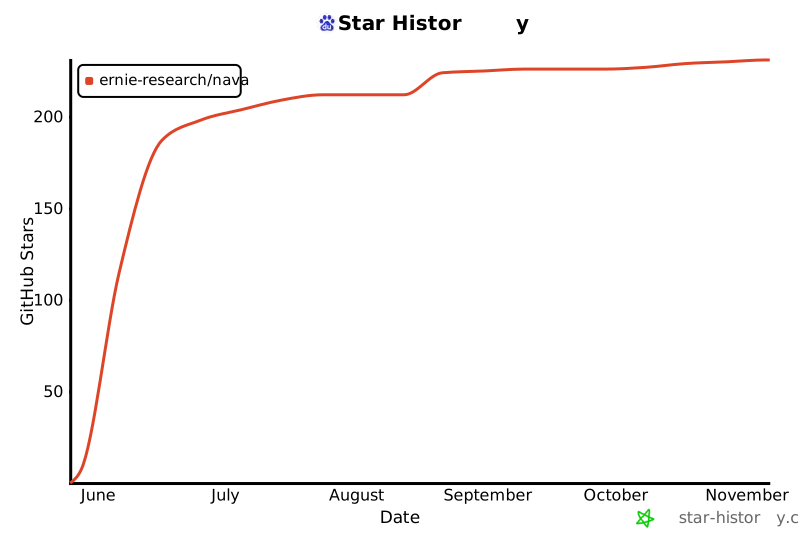
## NAVA Star History
[](https://star-history.com/#ernie-research/NAVA&Date)