# MTranServer
**Repository Path**: lovecross/MTranServer
## Basic Information
- **Project Name**: MTranServer
- **Description**: No description available
- **Primary Language**: Unknown
- **License**: Apache-2.0
- **Default Branch**: main
- **Homepage**: None
- **GVP Project**: No
## Statistics
- **Stars**: 0
- **Forks**: 0
- **Created**: 2025-06-01
- **Last Updated**: 2025-06-01
## Categories & Tags
**Categories**: Uncategorized
**Tags**: None
## README
# MTranServer
> Mini Translation Server Beta Version ⭐️ Please give me a Star
 [中文](README.md) | English
A high-performance offline translation server with minimal resource requirements - runs on CPU with just 1GB memory, no GPU needed. Average response time of 50ms per request. Supports translation of major languages worldwide.
Translation quality comparable to Google Translate.
Note: This model focuses on speed and private deployment on various devices, so the translation quality will not match that of large language models.
For high-quality translation, consider using online large language model APIs.
## Demo
> No demo yet, see preview image
 ## Comparison with Similar Projects (CPU, English to Chinese)
| Project Name | Memory Usage | Concurrency | Translation Quality | Speed | Additional Info |
| ---------------------------------------------------------------------- | -------------- | ----------- | ------------------- | ---------- | ----------------------------------------------------------------------------------------------------------------------------------------------------------------- |
| [facebook/nllb](https://github.com/facebookresearch/fairseq/tree/nllb) | Very High | Poor | Average | Slow | Android port [RTranslator](https://github.com/niedev/RTranslator) has many optimizations, but still has high resource usage and is not fast |
| [LibreTranslate](https://github.com/LibreTranslate/LibreTranslate) | Very High | Average | Average | Medium | Mid-range CPU processes 3 sentences/s, high-end CPU processes 15-20 sentences/s. [Details](https://community.libretranslate.com/t/performance-benchmark-data/486) |
| [OPUS-MT](https://github.com/OpenNMT/CTranslate2#benchmarks) | High | Average | Below Average | Fast | [Performance Tests](https://github.com/OpenNMT/CTranslate2#benchmarks) |
| Any LLM | Extremely High | Dynamic | Very Good | Very Slow | 32B+ parameter models work well but have high hardware requirements |
| MTranServer (This Project) | Low | High | Average | Ultra Fast | 50ms average response time per request |
> Existing small-parameter quantized versions of Transformer architecture large models are not considered, as actual research and usage have shown that translation quality is very unstable with random translations, severe hallucinations, and slow speeds. We will test Diffusion architecture language models when they are released.
>
> Table data is for reference only, not strict testing, non-quantized version comparison.
## Update Log
2025.03.22 v2.0.1 -> v2.0.2
- Adapt to AMD64 architecture
2025.03.21 v1.1.0 -> v2.0.1
- Adapt to ARM architecture
- Update the framework
- Update the models
2025.03.08 v1.0.4 -> v1.1.0
- Fixed memory overflow issue, now running a single English-Chinese model requires only 800M+ memory, and other language model memory usage has also been significantly reduced
- Added interfaces for multiple plugins
## Desktop Docker One-Click Package
> Desktop one-click package deployment requires `Docker Desktop` to be installed. Please install it yourself.
After ensuring that `Docker Desktop` is installed on your personal computer, download the desktop one-click package
[Mainland China One-Click Package Download](https://ocn4e4onws23.feishu.cn/drive/folder/QN1SfG7QeliVWGdDJ8Dce2sUnkf)
[International One-Click Package Download](https://github.com/xxnuo/MTranServer/releases/tag/onekey)
`Extract` to any English directory, the folder structure is as follows:
```
mtranserver/
├── compose.yml
├── models/
│ ├── enzh
│ ├── lex.50.50.enzh.s2t.bin
│ ├── model.enzh.intgemm.alphas.bin
│ └── vocab.enzh.spm
```
> If you are in mainland China, the network cannot access the Docker image download, please jump to the next section "1.3 Optional Step".
>
> The one-click package only includes the English-Chinese model, if you need to download other language models, please jump to the next section "Download Models".
Open the command line in the `mtranserver` directory and proceed to the `3. Start Service` section.
### Server Docker Compose Deployment
#### 1.1 Preparation
Create a folder for configuration files and run the following commands in terminal:
```bash
mkdir mtranserver
cd mtranserver
touch compose.yml
mkdir models
```
#### 1.2 Open `compose.yml` with an editor and write:
> 1. Change `your_token` below to your own password using English letters and numbers. For internal network use, setting a password is optional, but for `cloud servers`, it is strongly recommended to set a password to protect against `scanning, attacks, and abuse`.
>
> 2. To change the port, modify the `ports` value. For example, change to `9999:8989` to map the service port to local port 9999.
```yaml
services:
mtranserver:
image: xxnuo/mtranserver:latest
container_name: mtranserver
restart: unless-stopped
ports:
- "8989:8989"
volumes:
- ./models:/app/models
environment:
- CORE_API_TOKEN=your_token
```
#### 1.3 Optional Step
If you cannot download the image normally in mainland China, you can import the image as follows:
Mainland China Docker Image Download
Download the latest image `mtranserver.image.tar` to your Docker machine.
Open terminal in the download directory and run the following command to import the image:
```bash
docker load -i mtranserver.image.tar
```
Then proceed normally to the next step to download models.
### 2. Download Models
> Models are being continuously updated, if you don't have the language model you need, please contact me to add it.
Mainland China Model Mirror Download
International Download Link
Extract each language's compressed package into the `models` folder.
> Warning: If you use multiple models, memory usage will double, please choose the appropriate model according to your server configuration.
Example folder structure with English-Chinese model:
```
compose.yml
models/
├── enzh
│ ├── lex.50.50.enzh.s2t.bin
│ ├── model.enzh.intgemm.alphas.bin
│ └── vocab.enzh.spm
```
Example with Chinese-English and English-Chinese models:
```
compose.yml
models/
├── enzh
│ ├── lex.50.50.enzh.s2t.bin
│ ├── model.enzh.intgemm.alphas.bin
│ └── vocab.enzh.spm
├── zhen
│ ├── lex.50.50.zhen.t2s.bin
│ ├── model.zhen.intgemm.alphas.bin
│ └── vocab.zhen.spm
```
Note: For example, Chinese to Japanese translation first translates Chinese to English, then English to Japanese, requiring both `zhen` and `enja` models. Other language translations work similarly.
### 3. Start Service
First, test the service to ensure models are placed correctly, can load normally, and the port isn't occupied.
```bash
docker compose up
```
Example normal output:
```
[+] Running 2/2
✔ Network sample_default Created 0.1s
✔ Container mtranserver Created 0.1s
Attaching to mtranserver
mtranserver | (2025-03-03 12:49:24) [INFO ] Using maximum available worker count: 16
mtranserver | (2025-03-03 12:49:24) [INFO ] Starting Translation Service
mtranserver | (2025-03-03 12:49:24) [INFO ] Service port: 8989
mtranserver | (2025-03-03 12:49:24) [INFO ] Worker threads: 16
mtranserver | Successfully loaded model for language pair: enzh
mtranserver | (2025-03-03 12:49:24) [INFO ] Models loaded.
mtranserver | (2025-03-03 12:49:24) [INFO ] Using default max parallel translations: 32
mtranserver | (2025-03-03 12:49:24) [INFO ] Max parallel translations: 32
```
Then press `Ctrl+C` to stop the service, and start it officially:
```bash
docker compose up -d
```
The server will now run in the background.
### 4. Usage
In the following tables, `localhost` can be replaced with your server address or Docker container name.
The port `8989` can be replaced with the port value you set in `compose.yml`.
If `CORE_API_TOKEN` is not set or empty, translation plugins use the API without password.
If `CORE_API_TOKEN` is set, translation plugins use the API with password.
Replace `your_token` in the following tables with your `CORE_API_TOKEN` value from `config.ini`.
#### Translation Plugin Interfaces:
> Note:
>
> - [Immersive Translation](https://immersivetranslate.com/docs/services/custom/) - Enable `Beta` features in developer mode in `Settings` to see `Custom API Settings` under `Translation Services` ([official tutorial with images](https://immersivetranslate.com/docs/services/custom/)). Then increase the `Maximum Requests per Second` in `Custom API Settings` to fully utilize server performance. I set `Maximum Requests per Second` to `5000` and `Maximum Paragraphs per Request` to `10`. You can adjust based on your server hardware.
>
> - [Kiss Translator](https://github.com/fishjar/kiss-translator) - Scroll down in `Settings` page to find the custom interface `Custom`. Similarly, set `Maximum Concurrent Requests` and `Request Interval Time` to fully utilize server performance. I set `Maximum Concurrent Requests` to `100` and `Request Interval Time` to `1`. You can adjust based on your server configuration.
>
> Configure the plugin's custom interface address according to the table below. Note: The first request will be slower because it needs to load the model. Subsequent requests will be faster.
| Name | URL | Plugin Setting |
| ------------------------------------- | --------------------------------------------- | ----------------------------------------------------------------- |
| Immersive Translation (No Password) | `http://localhost:8989/imme` | `Custom API Settings` - `API URL` |
| Immersive Translation (With Password) | `http://localhost:8989/imme?token=your_token` | Same as above, change `your_token` to your `CORE_API_TOKEN` value |
| Kiss Translator (No Password) | `http://localhost:8989/kiss` | `Interface Settings` - `Custom` - `URL` |
| Kiss Translator (With Password) | `http://localhost:8989/kiss` | Same as above, fill `KEY` with `your_token` |
**Regular users can start using the service after setting up the plugin interface address according to the table above.**
### 5. Keep Updating
As this is a beta version of server and models, you may encounter issues. Regular updates are recommended.
Download new models, extract and overwrite the original `models` folder, then update and restart the server:
```bash
docker compose down
docker pull xxnuo/mtranserver:latest
docker compose up -d
```
> For users in mainland China who cannot `pull` the image normally, follow the `1.3 Optional Step` to manually download and import the new image.
### Developer APIs:
> Base URL: `http://localhost:8989`
| Name | URL | Request Format | Response Format | Auth Header |
| ----------------------- | ------------------ | ------------------------------------------------------------------------- | ----------------------------------------------- | ------------------------- |
| Service Version | `/version` | None | None | None |
| Language Pair List | `/models` | None | None | Authorization: your_token |
| Standard Translation | `/translate` | `{"from": "en", "to": "zh", "text": "Hello, world!"}` | `{"result": "你好,世界!"}` | Authorization: your_token |
| Batch Translation | `/translate/batch` | `{"from": "en", "to": "zh", "texts": ["Hello, world!", "Hello, world!"]}` | `{"results": ["你好,世界!", "你好,世界!"]}` | Authorization: your_token |
| Health Check | `/health` | None | `{"status": "ok"}` | None |
| Heartbeat Check | `/__heartbeat__` | None | `Ready` | None |
| Load Balancer Heartbeat | `/__lbheartbeat__` | None | `Ready` | None |
| Google Translate Compatible Interface 1 | `/language/translate/v2` | `{"q": "The Great Pyramid of Giza", "source": "en", "target": "zh", "format": "text"}` | `{"data": {"translations": [{"translatedText": "吉萨大金字塔"}]}}` | Authorization: your_token |
> Developer advanced settings please refer to [CONFIG.md](./CONFIG.md)
## Repository
Windows, Mac, and Linux standalone client software version: [MTranServerDesktop](https://github.com/xxnuo/MTranServerDesktop)
Server API repository: [MTranServerCore](https://github.com/xxnuo/MTranServerCore)
## Thanks
Inference Framework: C++ [Marian-NMT](https://marian-nmt.github.io) Framework
Translation Models: [firefox-translations-models](https://github.com/mozilla/firefox-translations-models)
> Join us: [https://www.mozilla.org/zh-CN/contribute/](https://www.mozilla.org/zh-CN/contribute/)
## Support Me
[Buy me a coffee ☕️](https://www.creem.io/payment/prod_3QOnrHlGyrtTaKHsOw9Vs1)
[Mainland China 💗 Like](./DONATE.md)
## Contact Me
WeChat Community

WeChat: x-xnuo
X: [@realxxnuo](https://x.com/realxxnuo)
Feel free to connect with me to discuss technology and open-source projects!
I'm currently seeking job opportunities. Please contact me to view my resume.
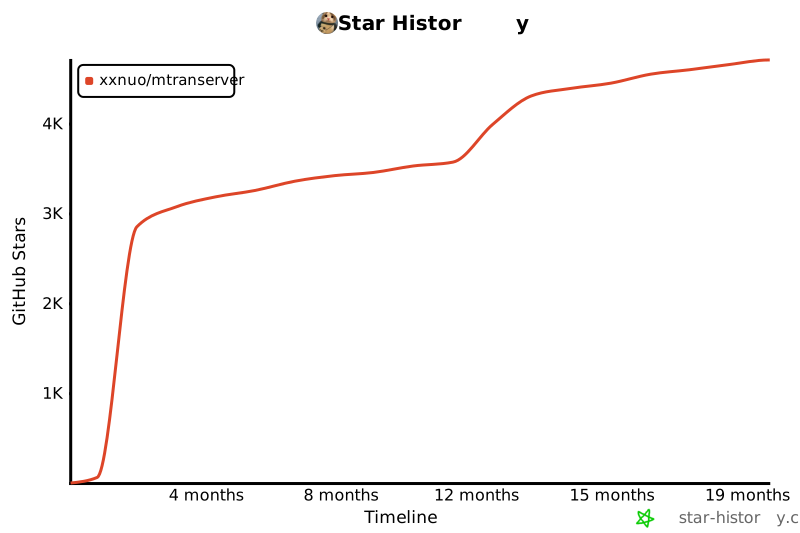
## Star History
[](https://star-history.com/#xxnuo/MTranServer&Timeline)