# ddddocr
**Repository Path**: yinxiaoxing/ddddocr
## Basic Information
- **Project Name**: ddddocr
- **Description**: ddddocr rust 版本,ocr_api_server rust 版本,二进制版本,验证码识别,不依赖 opencv 库,跨平台运行,AI MCP 支持,a simple OCR API server, very easy to deploy。
- **Primary Language**: Unknown
- **License**: Not specified
- **Default Branch**: master
- **Homepage**: None
- **GVP Project**: No
## Statistics
- **Stars**: 0
- **Forks**: 1
- **Created**: 2026-04-06
- **Last Updated**: 2026-04-06
## Categories & Tags
**Categories**: Uncategorized
**Tags**: None
## README
# Introduction
[中文](./README.md) | [English](./README_EN.md)
Rust version of ddddocr.
Rust version of ocr_api_server.
A binary release for captcha recognition, without relying on the OpenCV library, runs cross-platform.
A simple OCR API server, very easy to deploy.
[ ](https://github.com/86maid/ddddocr)
[![Forks][forks-shield]](https://github.com/86maid/ddddocr)
[![Stargazers][stars-shield]](https://github.com/86maid/ddddocr)
[](https://github.com/86maid/ddddocr/blob/master/LICENSE)
[forks-shield]: https://img.shields.io/github/forks/86maid/ddddocr?style=flat-square
[stars-shield]: https://img.shields.io/github/stars/86maid/ddddocr?style=flat-square

A user-friendly, universal captcha recognition Rust library
·
Report a Bug
·
Request a Feature
# Table of Contents
- [Introduction](#introduction)
- [Table of Contents](#table-of-contents)
- [Supported Environments](#supported-environments)
- [Installation](#installation)
- [Prebuilt binaries (if you prefer not to build from source)](#prebuilt-binaries-if-you-prefer-not-to-build-from-source)
- [GitHub Actions setup](#github-actions-setup)
- [Usage Documentation](#usage-documentation)
- [OCR Recognition](#ocr-recognition)
- [Primary Recognition](#primary-recognition)
- [Legacy Model](#legacy-model)
- [PNG Transparency Fix](#png-transparency-fix)
- [Color Filtering](#color-filtering)
- [Example Captures](#example-captures)
- [Object Detection](#object-detection)
- [Example Captures](#example-captures-1)
- [Slider Matching](#slider-matching)
- [Algorithm 1](#algorithm-1)
- [Algorithm 2](#algorithm-2)
- [OCR Probability Output](#ocr-probability-output)
- [Custom OCR Model Import](#custom-ocr-model-import)
- [ocr\_api\_server Examples](#ocr_api_server-examples)
- [Usage](#usage)
- [Run Examples](#run-examples)
- [API Specification](#api-specification)
- [Test Examples (`test_api.py`)](#test-examples-test_apipy)
- [MCP Protocol Support](#mcp-protocol-support)
- [MCP Request](#mcp-request)
- [MCP Response](#mcp-response)
- [Troubleshooting](#troubleshooting)
- [CUDA Issues](#cuda-issues)
# Supported Environments
| Platform | CPU | GPU | Notes |
| ---------------- | --- | --- | --------------------------------------------------------------------------------------------------------- |
| Windows 64-bit | √ | ? | Some Windows versions require installing the VC Runtime |
| Windows 32-bit | √ | ? | No static linking; some versions require the VC Runtime |
| Linux 64 / ARM64 | √ | ? | May need to upgrade glibc; see glibc upgrade |
| Linux 32 | × | ? | |
| macOS X64 | √ | ? | For M1/M2/M3 chips see #67 |
# Installation
The `lib.rs` provides the `ddddocr` crate, and `main.rs` implements the `ocr_api_server`.
The `model` directory contains models and character sets.
Add dependency:
```toml
ddddocr = { git = "https://github.com/86maid/ddddocr.git", branch = "master" }
```
Enable CUDA feature:
```toml
ddddocr = { git = "https://github.com/86maid/ddddocr.git", branch = "master", features = ["cuda"] }
```
Supports static and dynamic linking; static is default, automatically downloads necessary libraries (set proxy if required). CUDA feature does not support static linking (downloads dynamic libraries).
To troubleshoot, see [Troubleshooting](#troubleshooting).
## Prebuilt binaries (if you prefer not to build from source)
Download from the [Releases page](https://github.com/86maid/ddddocr/releases).
## GitHub Actions setup
Use the preconfigured workflows in `.github/workflows` for automated builds.
# Usage Documentation
## OCR Recognition
### Primary Recognition
Optimized for single-line text where the text occupies most of the image (e.g. alphanumeric captchas). Supports Chinese, English (mixed case or filtered via range), digits, and some special characters.
```rust
let image = std::fs::read("target.png").unwrap();
let mut ocr = ddddocr::ddddocr_classification().unwrap();
let res = ocr.classification(image).unwrap();
println!("{:?}", res);
```
### Legacy Model
```rust
let image = std::fs::read("target.png").unwrap();
let mut ocr = ddddocr::ddddocr_classification_old().unwrap();
let res = ocr.classification(image).unwrap();
println!("{:?}", res);
```
### PNG Transparency Fix
```rust
classification_with_png_fix(image, true);
```
### Color Filtering
Supported preset colors: red, blue, green, yellow, orange, purple, cyan, black, white, gray.
```rust
let ocr = ddddocr::ddddocr_classification().unwrap();
// Only green
println!(
"{}",
ocr.classification_with_filter(include_bytes!("../image/4.png"), "green").unwrap()
);
// Red and green
println!(
"{}",
ocr.classification_with_filter(include_bytes!("../image/4.png"), ["red", "green"]).unwrap()
);
// HSV ranges
println!(
"{}",
ocr.classification_with_filter(
include_bytes!("../image/4.png"),
[((40, 50, 50), (80, 255, 255))]
).unwrap()
);
```
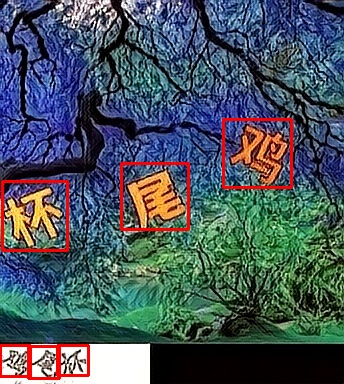
### Example Captures
 ## Object Detection
```rust
let image = std::fs::read("target.png").unwrap();
let mut det = ddddocr::ddddocr_detection().unwrap();
let res = det.detection(image).unwrap();
println!("{:?}", res);
```
### Example Captures
## Slider Matching
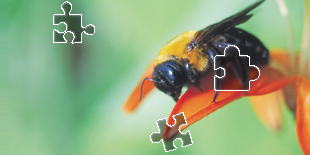
Non-deep-learning implementations.
### Algorithm 1
Small slider image (PNG with transparency):

Background with slot:
```rust
let target_bytes = std::fs::read("target.png").unwrap();
let background_bytes = std::fs::read("background.png").unwrap();
let res = ddddocr::slide_match(target_bytes, background_bytes).unwrap();
println!("{:?}", res);
```
Use `simple_slide_match` for minimal background:
```rust
let res = ddddocr::simple_slide_match(target_bytes, background_bytes).unwrap();
```
### Algorithm 2
Original image with slot:

Original full image:

```rust
let res = ddddocr::slide_comparison(target_bytes, background_bytes).unwrap();
println!("{:?}", res);
```
## OCR Probability Output
Provides full-character probability distributions for flexible result filtering. Use `classification_probability`, and set global or per-call ranges via `set_ranges`.
| Value | Meaning |
| ----- | -------------------------------------- |
| 0 | Digits 0-9 |
| 1 | Lowercase a-z |
| 2 | Uppercase A-Z |
| 3 | Lowercase + Uppercase |
| 4 | Lowercase + digits |
| 5 | Uppercase + digits |
| 6 | Lowercase + Uppercase + digits |
| 7 | Default (lowercase, uppercase, digits) |
Custom string without spaces: e.g. `"0123456789+-x/="`.
```rust
let mut ocr = ddddocr::ddddocr_classification().unwrap();
ocr.set_ranges("0123456789+-x/=");
let result = ocr.classification_probability(image).unwrap();
println!("Text: {}", result.get_text());
println!("Confidence: {}", result.get_confidence());
println!("Probabilities: {}", result.json());
```
## Custom OCR Model Import
Supports importing models trained by [dddd_trainer](https://github.com/sml2h3/dddd_trainer).
```rust
use ddddocr::*;
let mut ocr = Ddddocr::with_model_charset(
"myproject_0.984375_139_13000_2022-02-26-15-34-13.onnx",
"charsets.json",
).unwrap();
let image_bytes = std::fs::read("888e28774f815b01e871d474e5c84ff2.jpg").unwrap();
let res = ocr.classification(&image_bytes).unwrap();
println!("{:?}", res);
```
# ocr_api_server Examples
## Usage
```sh
Usage: ddddocr.exe [OPTIONS]
Options:
--address
Listening address. [default: 0.0.0.0:8000]
--mcp
Enable MCP protocol support.
--ocr
Enable content recognition (mutually exclusive with --old).
--old
Enable legacy model content recognition (mutually exclusive with --ocr).
--det
Enable object detection.
--slide
Enable slider captcha and gap recognition.
--ocr-charset-range
Global default character set for probabilistic recognition. If the API does not provide a character set, this parameter will be used. Values 0–7 select a built‑in character set; any other value specifies a custom character set (e.g. "0123456789+-x/="). If not set, the full character set is used without restriction.
--ocr-path
Path to the content recognition model and character set. If you have enabled the “inline-model” feature (enabled by default), you can ignore this option unless you want to use a custom model. The model file (common.onnx) and character set file (common.json) must have the same base name. [default: model/common.onnx]
--det-path
Path to the object detection model. If you have enabled the “inline-model” feature (enabled by default), you can ignore this option unless you want to use a custom model. [default: model/common_det.onnx]
--acme
Your domain name for automatic SSL certificate issuance (enables HTTPS support).
-h, --help
Print this help message
```
## Run Examples
```sh
# Start all features
ddddocr.exe --address 0.0.0.0:8000 --ocr --det --slide
# Show help
ddddocr.exe --help
```
## API Specification
| Endpoint | Method | Description |
| ------------------- | ------ | ------------------------ |
| `/ocr` | POST | Perform OCR |
| `/det` | POST | Perform object detection |
| `/slide-match` | POST | Slider matching |
| `/slide-comparison` | POST | Slider comparison |
| `/status` | GET | Get service status |
| `/docs` | GET | Swagger UI documentation |
## Test Examples (`test_api.py`)
```python
--> 200 GET /status
curl -X GET "http://127.0.0.1:8000/status"
{"code":200,"msg":"success","data":{"service_status":"running","enabled_features":["ocr","det","slide"]}}
--> 200 POST /ocr
curl -X POST "http://127.0.0.1:8000/ocr"
-H "Content-Type: application/json"
-d '{"image": "base64 image"}'
{"code":200,"msg":"success","data":{"text":"九乘六等于?","probability":null}}
--> 200 POST /det
curl -X POST "http://127.0.0.1:8000/det"
-H "Content-Type: application/json"
-d '{"image": "base64 image"}'
{"code":200,"msg":"success","data":{"bboxes":[[80,3,98,21],[56,6,76,25],[31,7,51,26],[2,2,21,22],[100,0,127,18]]}}
--> 200 POST /slide-match
curl -X POST "http://127.0.0.1:8000/slide-match"
-H "Content-Type: application/json"
-d '{"target_image": "base64 image", "background_image": "base64 image", "simple_target": true}'
{"code":200,"msg":"success","data":{"target":[215,45,261,91],"target_x":0,"target_y":45}}
--> 200 POST /slide-comparison
curl -X POST "http://127.0.0.1:8000/slide-comparison"
-H "Content-Type: application/json"
-d '{"target_image": "base64 image", "background_image": "base64 image"}'
{"code":200,"msg":"success","data":{"x":144,"y":76}}
```
## MCP Protocol Support
This project supports the Model Context Protocol (MCP) allowing AI Agents to call ddddocr.
- Capabilities: `GET /mcp/capabilities`
- Tool Call: `POST /mcp/call`
### MCP Request
```json
{
"tool_name": "ocr",
"input": {
"image": "base64 image",
"png_fix": true,
"probability": false,
"charset_range": "0123456789",
"color_filter": ["red", "blue"]
}
}
```
### MCP Response
```json
{
"output": {
"text": "123456",
"probability": null
},
"error": null
}
```
# Troubleshooting
We strongly recommend using the [GitHub Actions](https://github.com/86maid/ddddocr/tree/master/.github/workflows) for building.
### CUDA Issues
Ensure `CUDA` and `cuDNN` are installed.
- `CUDA 12` requires `cuDNN 9.x`.
- `CUDA 11` requires `cuDNN 8.x`.
Static linking is default; dynamic linking is available via the `load-dynamic` feature or by setting `ORT_LIB_LOCATION` to your ONNX Runtime library path.
Example:
```
ORT_LIB_LOCATION=onnxruntime/build/Windows/Release
```
ONNX Runtime v1.18.1 dynamic libraries should be placed in your executable directory or system path.
Refer to [ort.pyke.io](https://ort.pyke.io/) for more troubleshooting topics.